
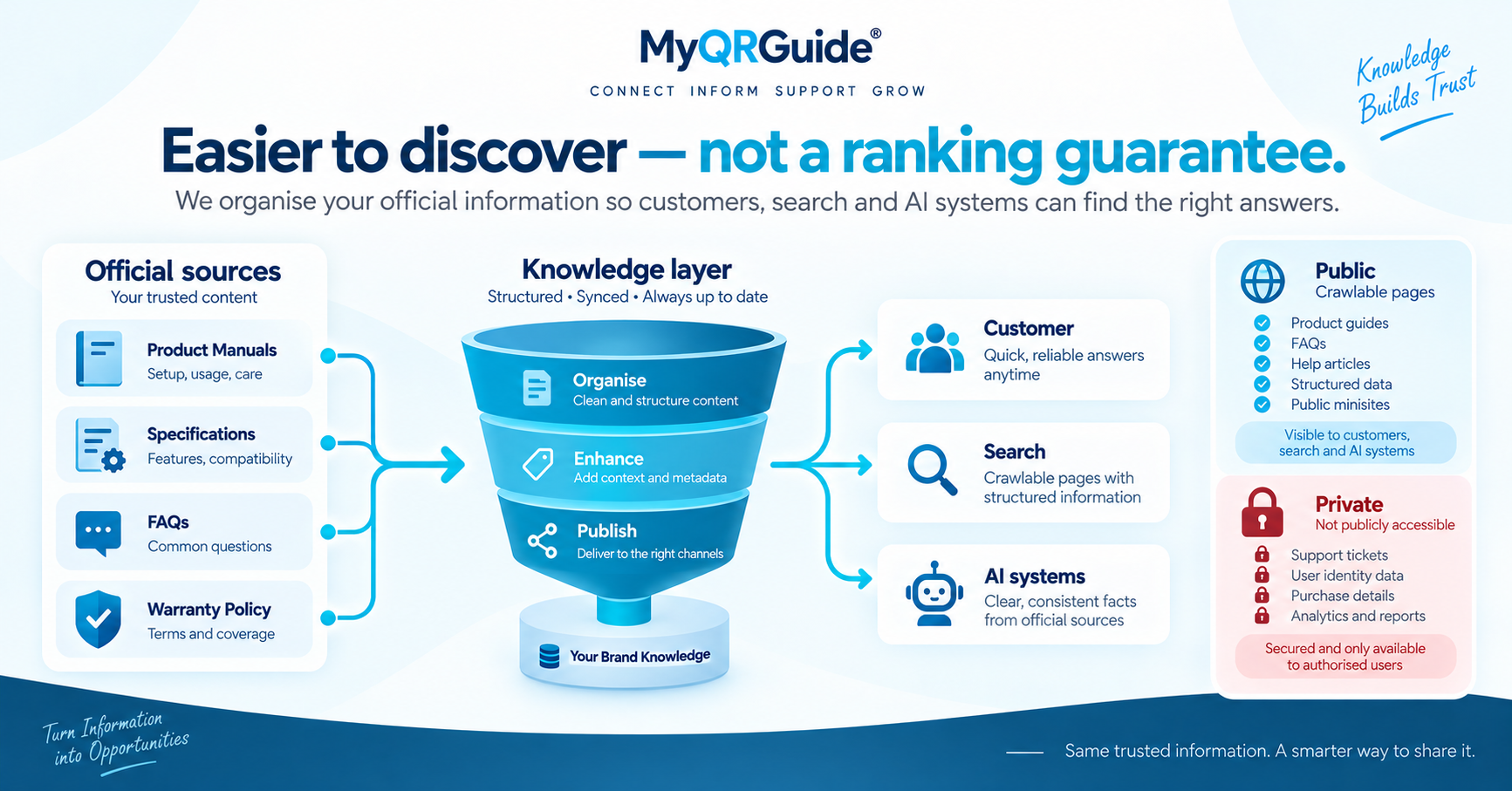
AI systems can only use product facts they can retrieve from a public page, a file you allow, or a system you control. They do not magically know a SKU because it exists in a warehouse spreadsheet.
Making information easier to discover is not the same as guaranteeing search ranking, indexing, model training, or a recommendation in ChatGPT, Perplexity, or Google AI features. Those outcomes depend on the systems themselves. Explore the setup: AI Knowledge Engine for official product knowledge.
Before and after (illustration)
This is a worked example, not a customer case study and not a ranking result.
Before. The brand prints a QR that opens a PDF on a shared drive. Setup steps sit in that file. A support inbox answers the same questions by email. An AI assistant that is asked “how do I reset this model?” is more likely to find a retailer listing, a forum post, or nothing official — because the brand never published a stable public page with those facts in HTML.
After. The same QR opens a Product Experience URL that does not change when the PDF is replaced. The product name, first-use steps, and the warranty rules the brand actually offers are visible in the page. The seller turns on Search & AI only after confirming rights to the name, images, and trademarks. Test Mini Sites stay unlisted. AI Product Expert™ can answer from that approved copy and still offer a person when the answer is not there.
Checklist
Do these in HTML on the live Product Experience — not only inside an image or a PDF:
- Give the Mini Site one stable URL and keep it.
- Put the same facts you would tell a customer on the page: name, how to start, care, and warranty rules you really offer.
- Opt the Mini Site into search and AI only when you have the rights to the product name, images, manuals, specs, and trademarks.
- Leave drafts, test sites, and reserved QR destinations unlisted.
- Show a clear route to human support. AI answers can be incomplete or incorrect.
What can be public, and what must stay private
| May be crawled when the Mini Site is live and opted in | Stays private |
|---|---|
| Product name, guides, specs, and FAQs you published on the Mini Site | Warranty submissions and claim records |
| This Knowledge Center, Help articles, and public marketing pages | Support tickets and live-chat transcripts |
| A Mini Site the seller listed for search and AI | Customer identity, receipts, and analytics |
A live but unlisted Mini Site can still open by QR. It is not listed in public sitemaps or llms.txt. Publication is not the same as indexation.
What MyQRGuide does with that
Public marketing pages, this Knowledge Center, Help articles, and seller-approved Mini Sites can be crawled. AI Product Expert™ answers from approved product knowledge and can escalate to a person.
Related: AI support for physical products. Packing list of what to write: what to put in product knowledge for AI support.